
How to Create Your Own Server (Custom Lobby) in CS2 on Cybershoke
Want to create your own CS2 server and play with friends in a custom lobby? On Cybershoke, it’s easy. With flexible settings, you can choose the format, map, number of slots, and other options to play exactly how you want.
Here’s a step-by-step guide to creating and launching your own server in CS2.
Step 1: Go to the Cybershoke Website
Open Cybershoke: https://cybershoke.net/matches
Here you can see all available matches and your current lobbies.
Step 2: Create a Custom Lobby
Click the “Create” button. You’ll be asked to choose a lobby type:
- Public — anyone can join;
- Password-Protected — entry only with a password;
- Private (Hidden) — lobby is not visible in the list, entry is by invitation and password only.
Choose the type depending on whether you want to play with friends, acquaintances, or open to all.
Step 3: Customize Your Server
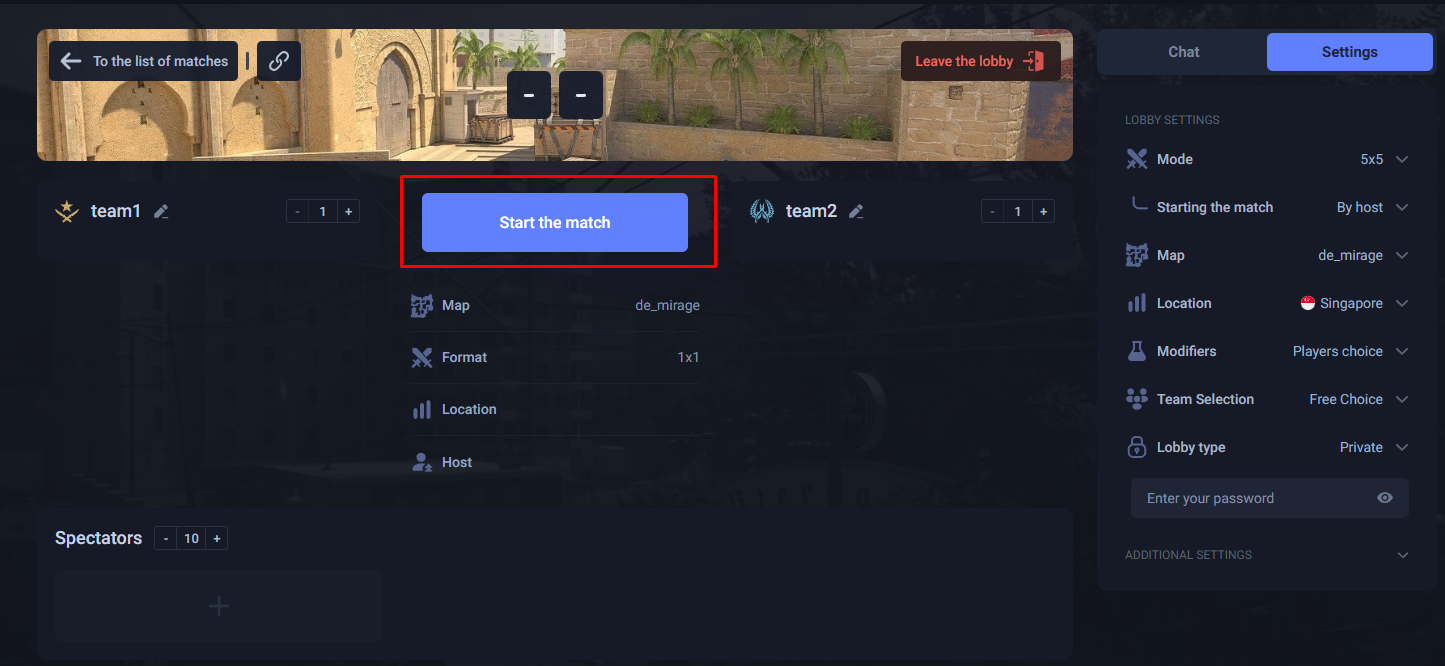
After creating the lobby, you can configure the server settings:
- Number of slots — how many players can join;
- Game format — e.g., 1v1, 5v5, or free mode;
- Map selection — choose any CS2 map for your lobby;
- Server location — select the region for minimal ping;
- Additional settings — round timers, weapons, special rules, and more.

These options make your custom lobby fully tailored to your needs.
Step 4: Launch Your Server
To make your lobby available for players:
- Click “Start the match”;
- The server will be assigned to participants in seconds;
- A button will appear on the screen:
- Join Server;
- Copy IP — use this to connect through the CS2 console.
Now you and your friends can start playing on your own server immediately.
Benefits of Creating a Custom Lobby on Cybershoke
- Full control — choose the map, format, and rules;
- Quick connection — the server is ready in seconds;
- Play with friends — create private lobbies and control who joins;
- Flexible settings — adjust all parameters to suit your style;
- Optimized for CS2 — stable server with minimal ping.
Creating a custom lobby on Cybershoke is the best way to play CS2 with friends on your own terms.
Conclusion
Creating a CS2 server on Cybershoke is simple: visit the website, select your lobby type, customize the server, and click “Launch Match”. Instant connection, flexible settings, and the ability to play with friends make Cybershoke the perfect platform for custom CS2 lobbies.
Start creating your server now: Cybershoke — Matches